

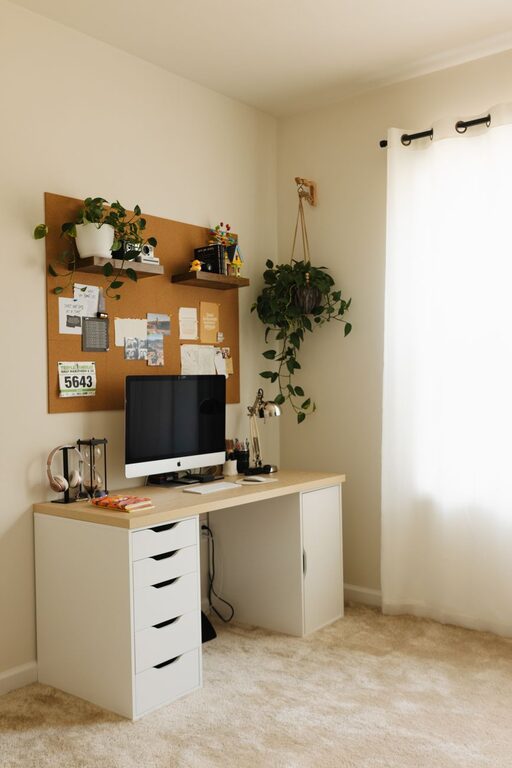
Creating a productive home office environment is essential for anyone who works remotely or spends significant time working from home. A well-designed workspace can improve your focus, reduce stress, and help you maintain a healthy work-life balance. Whether you’re setting up a new space or enhancing your current setup, these tips will guide you to create an efficient, comfortable, and inspiring home office.
Choose the Right Location
Selecting the best spot in your home is the first step to creating a productive office. Ideally, pick a quiet area with minimal distractions.
– Natural Light: Try to position your desk near a window for natural light, which can boost mood and alertness.
– Away From Noise: Avoid high-traffic areas like the kitchen or living room where noise and interruptions are common.
– Privacy: If possible, choose a separate room where you can close the door to signal to others that you’re working.
Invest in Comfortable Furniture
Comfort has a direct impact on productivity. Sitting for long hours in an uncomfortable chair or at the wrong desk height can lead to fatigue and health issues.
– Ergonomic Chair: Choose a chair that supports your lower back and allows your feet to rest flat on the floor.
– Desk Height: Your desk should be at a height where your forearms rest parallel to the floor when typing.
– Adjustable Furniture: Consider a sit-stand desk or adjustable monitor stands to vary your posture during the day.
Organize Your Workspace
An organized workspace helps minimize distractions and streamlines your workflow.
– Declutter Regularly: Remove unnecessary items from your desk to keep your focus on work.
– Storage Solutions: Use shelves, filing cabinets, or desk organizers to store supplies and documents.
– Keep Essentials Nearby: Keep frequently used items like pens, notebooks, and chargers within easy reach.
Optimize Lighting
Lighting plays a crucial role in reducing eye strain and maintaining energy levels.
– Balanced Lighting: Combine natural light with adjustable desk lamps to avoid harsh shadows or glare.
– Avoid Screen Glare: Position your monitor so it doesn’t reflect windows or strong light sources.
– Warm vs. Cool Light: Use cooler, brighter light during work hours to stay alert, and softer warm light for breaks.
Minimize Distractions
Creating boundaries, both physical and mental, helps maintain your concentration.
– Set a Work Schedule: Communicate your working hours to family or housemates.
– Use Noise Control: Noise-canceling headphones or white noise machines can block disruptive sounds.
– Limit Phone Use: Turn off non-work-related notifications to reduce interruptions.
Personalize Your Space
Adding personal touches can make your home office a pleasant and motivating place.
– Plants: Indoor plants improve air quality and add a calming element.
– Artwork or Photos: Visual elements that inspire or relax you can enhance your mood.
– Color Choices: Use colors that promote productivity and focus, such as blues or greens.
Technology Setup
Reliable technology is vital to maintain smooth workdays.
– High-Speed Internet: Ensure your internet connection supports video calls and file transfers.
– Quality Equipment: Invest in a good-quality monitor, keyboard, mouse, and webcam.
– Cable Management: Use clips or sleeves to keep cables organized and prevent clutter.
Take Regular Breaks
Even with the most effective setup, it’s important to rest to maintain productivity and well-being.
– Practice the 20-20-20 Rule: Every 20 minutes, look at something 20 feet away for 20 seconds to reduce eye strain.
– Move Around: Stand, stretch, or take short walks to boost circulation and prevent stiffness.
– Hydrate and Snack: Keep water and healthy snacks nearby to maintain energy levels.
Maintain Work-Life Balance
Separating work time from personal time can improve your productivity and mental health.
– Create Boundaries: Use your workspace only for work and change environments after work hours.
– End-of-Day Routine: Develop a routine to “close” your workday, such as shutting down your computer or tidying your desk.
– Schedule Downtime: Plan activities after work to relax and recharge.
—
By applying these tips, you can transform your home office into a space that supports your productivity, comfort, and overall well-being. Remember that creating an effective workspace is a gradual process—adjust your setup until it fits your needs perfectly. Happy working!